
On this page
01. What it shows02. Run it03. Settle a dispute04. Spot buddy punching05. Keep it06. A typical scenario07. Common mistakes08. Quick checklist09. Frequently asked questions
Open Attendance > Transaction or Report > Attendance Report > Transactions, choose the employee and dates and read each punch with its time and device. Use it to verify disputes and spot unusual patterns.
Key takeaways
- It shows every raw punch.
- Use it to settle disputes.
- Look for patterns, not single events.
- Export it before any disputed edit.
01What it shows
- Employee ID and name.
- Punch date and time.
- Device that recorded it.
- Verify type (fingerprint, card, password) depending on version.
02Run it
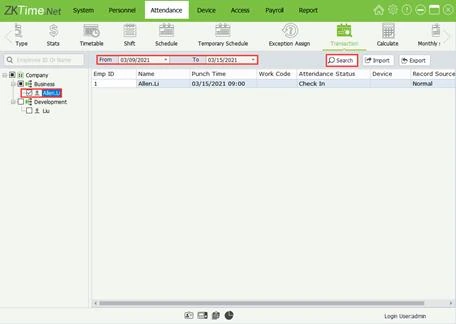
- Open Attendance > Transaction.
- Select the employee or department.
- Set the date range.
- Click Search.
- Export if you need a copy.
03Settle a dispute
Compare the claim with the raw punch. If the terminal clock was wrong, correct the calculation but keep both records, and fix the clock (set the time).
04Spot buddy punching
Warning signs include two people punching within seconds on the same finger pattern, a person punching at times they could not be on site, or one finger working for two IDs. See buddy punching and consider face recognition for high-risk sites.
05Keep it
Archive transactions for the retention period. They are the primary record; reports are derived.
06A typical scenario
Two employees were punching within seconds of each other every morning, and one of them was absent on site visits. The Transactions report made the pattern obvious, and management moved to a face terminal for that gate.
Illustrative example based on common cases, not a named customer.
07Common mistakes
- Relying only on summaries.
- Ignoring odd patterns.
- Deleting evidence.
- Not keeping archives.
- Accusing without checking the clock.
08Quick checklist
- Choose employee and dates
- Read raw punches
- Compare with claims
- Check the clock
- Export evidence
- Decide with HR
09Frequently asked questions
Does it show who edited a record?
Edited records are marked in many versions; check the report options.
Can punches be deleted?
Restrict the right to administrators and keep backups.
Why do I see a punch that is not mine?
The ID may be wrong or duplicated. See duplicate IDs.
Can I filter by device?
Yes, filter by device or area in the report.
This guide is part of our ZKTeco K40 and ZKBio Time.Net series. For the full start-to-finish walkthrough with screenshots, read How to Configure a ZKTeco K40 Pro with ZKBio Time.Net.
ZKTeco and ZKBio are trademarks of ZKTeco Inc. Menu names on the K40 Pro and in the software vary slightly by firmware and software version; where yours differ, look for the nearest match. Qyvea is a ZKTeco reseller and installer in Kenya.
