
On this page
01. Signs02. Compare03. Fix04. Prevent05. A typical scenario06. Common mistakes07. Quick checklist08. Frequently asked questions
Compare the user list on the terminal with the employee list in the software, correct the ID on one side so they are identical, then sync and recalculate. Keep IDs as plain digits with no leading zeros.
Key takeaways
- IDs must match exactly.
- Avoid leading zeros.
- Fix on one side, then sync.
- Document your ID rules.
01Signs
- Two records for one person.
- Punches under an unknown number.
- 'Employee does not exist' during import.
- Unexpected absences.
02Compare
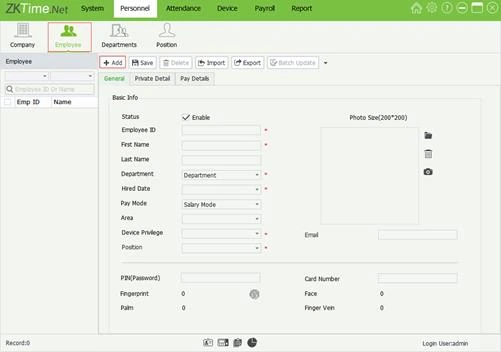
Export the terminal's user list (USB or the software) and the employee list, and compare IDs side by side.
03Fix
- Decide the correct ID, normally the payroll number.
- Edit the wrong side so both match.
- Delete the stray record only after you have copied what you need.
- Sync Data, then recalculate.
04Prevent
- Use a payroll number as ID.
- No leading zeros.
- Never reuse an ID for a new person.
- Write the ID rule in your HR process.
05A typical scenario
A staff member appeared as 15 on the terminal and 015 in the software. Half their punches were in each record. Standardising on 15 and re-syncing combined them.
Illustrative example based on common cases, not a named customer.
06Common mistakes
- Leading zeros.
- Reusing IDs.
- Different IDs per terminal.
- Importing without a check.
- No ID rule.
07Quick checklist
- List both sides
- Compare
- Choose the correct ID
- Edit
- Sync
- Recalculate
08Frequently asked questions
What happens to old punches under the wrong ID?
They stay under that ID. You may need to correct reports manually or merge, depending on the version.
Can two terminals have different IDs for one person?
They should not. Keep one ID company-wide.
Can I change IDs in bulk?
Via import/export in Excel carefully, after a backup.
Who owns ID rules?
HR, with IT enforcing them.
This guide is part of our ZKTeco K40 and ZKBio Time.Net series. For the full start-to-finish walkthrough with screenshots, read How to Configure a ZKTeco K40 Pro with ZKBio Time.Net.
ZKTeco and ZKBio are trademarks of ZKTeco Inc. Menu names on the K40 Pro and in the software vary slightly by firmware and software version; where yours differ, look for the nearest match. Qyvea is a ZKTeco reseller and installer in Kenya.
