
On this page
01. 1. Is a shift assigned?02. 2. Is the punch inside the window?03. 3. Did you recalculate?04. 4. IDs and department05. 5. Holidays and leave06. A typical scenario07. Common mistakes08. Quick checklist09. Frequently asked questions
Check that a shift is assigned for the date, that the punches fall inside the timetable's punch windows, that Calculate was run after the punches arrived and that the employee ID matches.
Key takeaways
- Assign a shift for the date.
- Punch time must be inside the punch window.
- Run Calculate again.
- Confirm the ID matches.
011. Is a shift assigned?
No shift for that date means the software cannot judge presence. See assign a shift.
022. Is the punch inside the window?
The timetable accepts punches only between its punch-from and punch-to times. A punch outside, such as arrival three hours early, is ignored for that day. Widen the windows if needed.
033. Did you recalculate?
New punches need Calculate to appear in results.
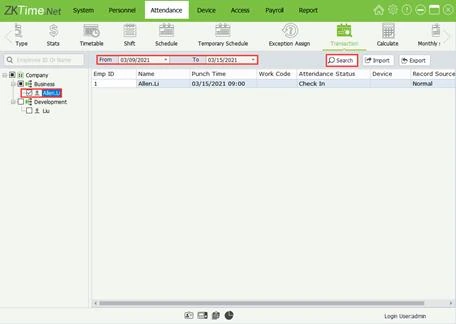
044. IDs and department
Check the transaction has the right employee ID. See duplicate IDs.
055. Holidays and leave
A holiday or leave record can change how a day shows. See leave and holidays.
06A typical scenario
A new team showed absent for a week although the punches were there. No shift had been assigned. Assigning it and recalculating cleared every false absence.
Illustrative example based on common cases, not a named customer.
07Common mistakes
- No shift assigned.
- Narrow punch windows.
- No recalculation.
- Wrong IDs.
- Leave not entered.
08Quick checklist
- Shift assigned
- Windows checked
- Recalculate
- IDs checked
- Holidays checked
- Spot-check
09Frequently asked questions
Why only some people?
Their assignment or ID is different.
Could the terminal clock be wrong?
Yes. See wrong punch times.
What if only the check-out is missing?
The day may show incomplete. Add an approved manual punch.
Is this a bug?
Usually it is setup, not a bug.
This guide is part of our ZKTeco K40 and ZKBio Time.Net series. For the full start-to-finish walkthrough with screenshots, read How to Configure a ZKTeco K40 Pro with ZKBio Time.Net.
ZKTeco and ZKBio are trademarks of ZKTeco Inc. Menu names on the K40 Pro and in the software vary slightly by firmware and software version; where yours differ, look for the nearest match. Qyvea is a ZKTeco reseller and installer in Kenya.
