
On this page
01. Monthly summary02. Time Card03. How to run them04. Make sign-off easy05. Combine with other reports06. A typical scenario07. Common mistakes08. Quick checklist09. Frequently asked questions
After calculating, open Report > Attendance Report > View Report and choose the monthly summary for team totals, or Time Card for a printable page per employee. Filter by department, then print or export.
Key takeaways
- Summary = team totals; Time Card = one page per person.
- Calculate before reporting.
- Get signatures on Time Cards.
- Keep a copy with payroll.
01Monthly summary
A monthly summary lists, per employee, days present, absent, late, early and overtime. It is the best single sheet for payroll and managers.
02Time Card
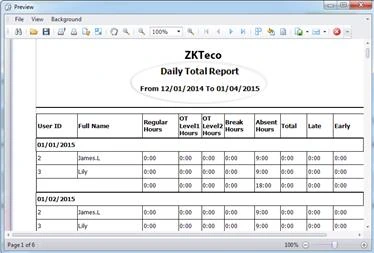
A time card shows every day of the month for one employee with check-in and check-out times and the result. Print them for staff to sign off, which settles disputes before pay day.
03How to run them
- Download punches and calculate for the month.
- Open Report > Attendance Report > View Report.
- Pick Monthly Summary or Time Card.
- Choose the month and the department.
- Search, then print or export.
04Make sign-off easy
- Print time cards on the 28th for staff to check.
- Give staff three days to flag problems.
- Add approved corrections, recalculate and issue final copies.
05Combine with other reports
Use the daily report (daily guide) for day-to-day and the late report (late guide) for follow-up.
06A typical scenario
A school printed Time Cards for each teacher on the 26th, asked them to check and sign within three days, corrected genuine errors, then issued final cards. Disputes after payday almost disappeared.
Illustrative example based on common cases, not a named customer.
07Common mistakes
- Printing before corrections.
- Giving no time to check.
- Mixing departments.
- No signature.
- Losing the paper copies.
08Quick checklist
- Calculated
- Time Cards printed
- Staff check
- Corrections made
- Recalculated
- Final copies filed
09Frequently asked questions
Can I print time cards for the whole company?
Yes, but print department by department to keep stacks manageable.
Can staff see their own time card?
Print or email it, or give controlled access if your version supports employee self-service.
What if an employee disputes a time?
Check the raw punch in the Transactions report. See the punch audit guide.
How long should I keep time cards?
Follow your retention policy and Kenyan law; many firms keep payroll records for several years.
This guide is part of our ZKTeco K40 and ZKBio Time.Net series. For the full start-to-finish walkthrough with screenshots, read How to Configure a ZKTeco K40 Pro with ZKBio Time.Net.
ZKTeco and ZKBio are trademarks of ZKTeco Inc. Menu names on the K40 Pro and in the software vary slightly by firmware and software version; where yours differ, look for the nearest match. Qyvea is a ZKTeco reseller and installer in Kenya.
