
On this page
01. How lateness is counted02. Get the report03. Make it fair04. Use the data05. Export06. A typical scenario07. Common mistakes08. Quick checklist09. Frequently asked questions
Set Allow Late-In and Allow Early-Out in your timetable, calculate attendance for the period, then run the attendance report and filter on late-in or early-out. Export the list for HR.
Key takeaways
- Grace minutes decide what counts as late.
- Terminal clock must be right.
- Calculate before reporting.
- Share the rule with staff first.
01How lateness is counted
Late-in is the minutes after check-in time beyond the allowed grace. Early-out is the minutes before check-out beyond the allowed grace. Both come from your timetable. See timetable setup.
02Get the report
- Download punches and run Calculate for the period.
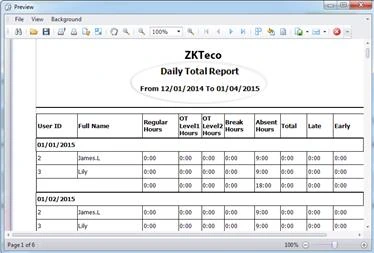
- Open Report > Attendance Report > View Report.
- Choose Daily Total or the monthly summary.
- Select the department and month.
- Sort or filter on Late and Early columns.
03Make it fair
- Agree grace minutes and publish them.
- Check the terminal time is accurate (set the time).
- Allow for queues if many people punch at once; place the terminal well (where to install).
- Look at patterns, not single minutes.
04Use the data
Share the monthly list with department heads. Look at repeated lateness, not one-off events. Combine it with leave data so approved absences are not penalised.
05Export
Send it to payroll or HR in Excel. See export to Excel.
06A typical scenario
A call centre published its five-minute grace rule, aligned the terminal clock and then reviewed repeated lateness monthly. Complaints about unfairness dropped, and the few repeat cases were handled with a conversation, not a surprise deduction.
Illustrative example based on common cases, not a named customer.
07Common mistakes
- Counting lateness against a fast terminal clock.
- No grace policy.
- Penalising approved late starts.
- Looking only at single events.
- Not telling staff the rule.
08Quick checklist
- Policy agreed
- Clock checked
- Calculated
- Report run
- Exceptions removed
- Follow-up recorded
09Frequently asked questions
Can I set different grace periods for different teams?
Yes, make a timetable per team with its own grace minutes.
Why is everyone late by the same amount?
The terminal clock is probably fast, or the check-in time in the timetable is wrong.
Do approved late arrivals count?
Add a leave or manual record so they do not.
Can late time be deducted from pay?
That is a payroll policy. The software supplies the minutes; follow Kenyan employment law and your contracts.
This guide is part of our ZKTeco K40 and ZKBio Time.Net series. For the full start-to-finish walkthrough with screenshots, read How to Configure a ZKTeco K40 Pro with ZKBio Time.Net.
ZKTeco and ZKBio are trademarks of ZKTeco Inc. Menu names on the K40 Pro and in the software vary slightly by firmware and software version; where yours differ, look for the nearest match. Qyvea is a ZKTeco reseller and installer in Kenya.
