
On this page
01. Where to download it safely02. What the PC needs first03. Install step by step04. First launch05. If the install fails06. A typical scenario07. Common mistakes08. Quick checklist09. Frequently asked questions
Get ZKBio Time.Net from ZKTeco or from the supplier who sold you the terminal, install .NET Framework 4.0 first, then run Setup.exe as administrator and allow the SDK and firewall prompts. Do not download cracked copies: they often carry malware and break device communication.
Key takeaways
- Use the installer from ZKTeco or your supplier, not a file-sharing site.
- Install .NET Framework 4.0 before the software.
- Run Setup.exe as administrator and allow the SDK.
- Keep your licence details: you may need them to unlock all features.
01Where to download it safely
The safest sources are ZKTeco's own download centre, the CD or link that came with your terminal, or the dealer who supplied it. A dealer such as Qyvea can send you the right installer for your terminal model and tell you which version matches your firmware.
- Check that the file name and version match what your supplier gave you.
- Scan the installer with Windows Security before running it.
- Avoid anything that promises a free crack or keygen. These copies are a common way for ransomware to reach an office PC.
02What the PC needs first
Prepare the computer before you run the installer.
- Windows 7, 8, 8.1, 10 or 11 (see our system requirements guide).
- Administrator rights on the PC.
- About 100 GB of free disk space for long-term records, and 4 GB RAM or more.
- The .NET Framework 4.0 setup file, which normally ships inside the installer folder.
03Install step by step
- Uninstall any older version and restart the PC.
- Run
dotNetFx40_Full_x86_x64.exeif .NET 4.0 is not already present. - Right-click
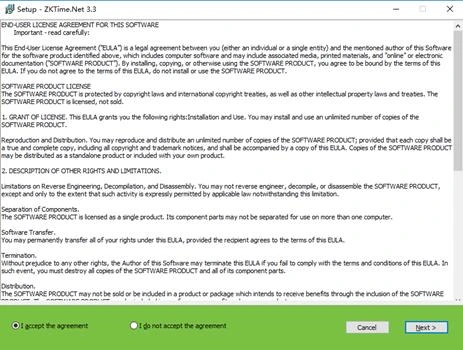
Setup.exeand choose Run as administrator. - Accept the licence, keep the default folder and click Next until Install.
- When Windows asks about the ZKTeco communication SDK, allow it.
- If Windows Firewall asks, choose Allow so the PC can reach the terminal.
04First launch
On first start the software asks you to register an administrator. Pick a password you will remember and write it down in a safe place. Then continue with the add the device guide to connect your terminal.
05If the install fails
Most failures are one of three things: .NET 4.0 missing, an old version still present, or antivirus blocking the SDK. See the .NET error guide and the SDK error guide for fixes.
06A typical scenario
A Westlands accounting firm bought a K40 Pro and downloaded 'ZKBio Time.Net full free' from a file site. The installer ran, but the antivirus flagged a file and the PC could not reach the terminal. The fix was to uninstall it, ask the dealer for the real installer, install .NET first and run Setup.exe as administrator. It connected on the first try.
Illustrative example based on common cases, not a named customer.
07Common mistakes
- Running Setup.exe without administrator rights, so the SDK never registers.
- Installing on a laptop that is switched off most evenings.
- Skipping .NET Framework 4.0 and then wondering why the wizard stops.
- Leaving the old version installed next to the new one.
- Forgetting to note the administrator password.
08Quick checklist
- Installer from ZKTeco or the dealer
- .NET Framework 4.0 present
- Setup.exe run as administrator
- SDK and firewall prompts allowed
- Administrator registered and password stored
- Test connection to the terminal
09Frequently asked questions
Is ZKBio Time.Net free?
ZKTeco supplies the Windows attendance software to buyers of its terminals, but licensing and feature limits can differ by version and by the number of devices. Ask the supplier who sold you the terminal what your licence covers.
Can I download it from any website?
We advise against it. Use ZKTeco or your dealer. Unofficial copies may be modified, outdated or infected.
Does it install on a laptop?
Yes, but a laptop that is often switched off or moved is a poor choice. Install it on an office PC that stays on so you can download punches whenever you need.
Can Qyvea install it for me?
Yes. We install the software, connect the terminal, enrol your staff and train your HR team across Kenya.
This guide is part of our ZKTeco K40 and ZKBio Time.Net series. For the full start-to-finish walkthrough with screenshots, read How to Configure a ZKTeco K40 Pro with ZKBio Time.Net.
ZKTeco and ZKBio are trademarks of ZKTeco Inc. Menu names on the K40 Pro and in the software vary slightly by firmware and software version; where yours differ, look for the nearest match. Qyvea is a ZKTeco reseller and installer in Kenya.
