
On this page
01. Areas02. Departments03. Positions (optional)04. A worked example05. Next steps06. A typical scenario07. Common mistakes08. Quick checklist09. Frequently asked questions
Create areas under Device > Area for each site or device group, and departments under Personnel > Department for each team. Assign each device to one area and each employee to a department and the areas where they may punch.
Key takeaways
- Area = where the device is; department = which team the person is in.
- A device belongs to one area.
- Assign shifts by department.
- Use the Parent field to nest departments.
01Areas
An area is a place or group of devices, for example Head Office, Warehouse or Mombasa Branch. Create it under Device > Area > Add. Each device belongs to exactly one area. Employees are then linked to the areas where they may punch.
02Departments
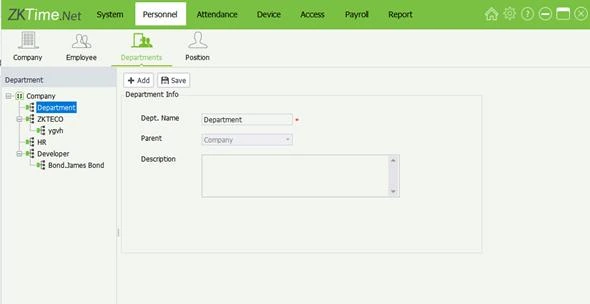
A department is a team: Admin, Sales, Security, Cleaning. Create them under Personnel > Department > Add. Use the Parent field to nest sub-teams. Departments drive shifts and reports.
03Positions (optional)
Job titles under Personnel > Position are useful in reports but not required.
04A worked example
- Areas: Head Office, Warehouse.
- Departments: Admin, Sales (under Head Office team), Loaders, Drivers (Warehouse team).
- Devices: K40 Pro at reception in Head Office area; K40 Pro at the gate in Warehouse area.
- Shifts: Office 8 to 5 for Admin and Sales; Warehouse 6 to 3 for Loaders and Drivers.
05Next steps
Add people (add an employee) and build shifts (timetable and shift).
06A typical scenario
A distributor created one area per depot and one department per team. When a manager asked for a report of only the Nakuru depot drivers, filtering by area and department gave it in seconds, with no spreadsheet clean-up.
Illustrative example based on common cases, not a named customer.
07Common mistakes
- Treating area and department as the same thing.
- Creating too many tiny departments.
- Putting every device in one area for convenience.
- Renaming areas often.
- Forgetting to assign employees to areas.
08Quick checklist
- Areas for sites
- Departments for teams
- Devices assigned to one area
- Employees linked to areas
- Shifts assigned by department
- Names kept consistent
09Frequently asked questions
Can an employee be in two areas?
Yes, if they work at more than one site and you allow both areas.
What if I rename a department?
Reports show the new name; history stays linked.
Do I need areas for a single terminal?
Yes, create one area. A device cannot be added without it.
How many departments can I have?
Plenty. Keep them practical; hundreds make reports hard to read.
This guide is part of our ZKTeco K40 and ZKBio Time.Net series. For the full start-to-finish walkthrough with screenshots, read How to Configure a ZKTeco K40 Pro with ZKBio Time.Net.
ZKTeco and ZKBio are trademarks of ZKTeco Inc. Menu names on the K40 Pro and in the software vary slightly by firmware and software version; where yours differ, look for the nearest match. Qyvea is a ZKTeco reseller and installer in Kenya.
