
On this page
01. The problem02. Create the timetable03. Build a rotating shift04. Assign and test05. If hours look wrong06. A typical scenario07. Common mistakes08. Quick checklist09. Frequently asked questions
Create a timetable whose check-out time is earlier than check-in (for example 18:00 to 06:00), make sure your version marks it as cross-day, widen the punch windows, and assign the shift to the night team.
Key takeaways
- Check-out earlier than check-in means a cross-day timetable.
- Widen the punch-from and punch-to windows.
- Keep day and night staff in separate departments.
- Test with one person first.
01The problem
Day-shift logic assumes a punch-in and punch-out on the same date. A night shift crosses midnight, so the software must know the end belongs to the next day.
02Create the timetable
- Open Attendance > Timetable Setting > Add.
- Name it Night 6pm to 6am.
- Check-In 18:00, Check-Out 06:00 (the next day).
- If your version has a cross-day or next-day option, tick it.
- Make the punch windows wide enough: begin about two hours before 18:00 and end about two hours after 06:00.
- Enable OT if relevant and Save.
03Build a rotating shift
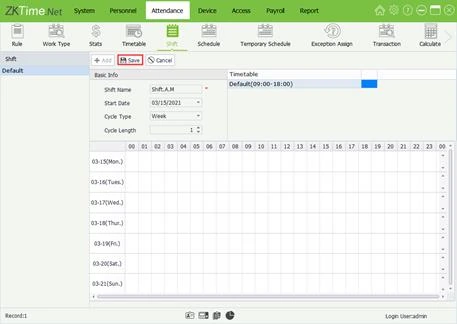
Guards often rotate: two days, two nights, two rest days. Build a shift with a 6-day cycle and drag day, night and rest timetables onto the right days. See timetable and shift.
04Assign and test
Assign to a night department and run Calculate for a couple of days. Check one person's punches in the Transaction list against the result.
05If hours look wrong
- Punches missing: check the terminal clock and time zone.
- Splitting into two days: widen the punch windows or fix the cross-day flag.
- Overtime too high: review the break and OT rules.
06A typical scenario
A Thika security firm had guards on 6pm to 6am. Their hours were split across two days until the timetable was set up as cross-day with wide punch windows. After that each night showed as one clean 12-hour shift.
Illustrative example based on common cases, not a named customer.
07Common mistakes
- Setting check-out earlier than check-in without the cross-day flag.
- Punch windows too narrow for late departures.
- Mixing day and night staff in one department.
- Not testing with real punches.
- Forgetting rest days in a rotation.
08Quick checklist
- Cross-day timetable
- Wide punch windows
- Rotation shift built
- Night department assigned
- Test on two nights
- Check OT rules
09Frequently asked questions
Can the same person work days one week and nights the next?
Yes. Build a longer shift cycle or assign different shifts by date range.
Which date does a night shift report under?
Usually the date of check-in. Confirm in a test run.
Do I need a different terminal for nights?
No. The same terminal works; the shift logic does the rest.
Does Qyvea help with guard rosters?
Yes, we set up shifts for security companies and factories. Message us.
This guide is part of our ZKTeco K40 and ZKBio Time.Net series. For the full start-to-finish walkthrough with screenshots, read How to Configure a ZKTeco K40 Pro with ZKBio Time.Net.
ZKTeco and ZKBio are trademarks of ZKTeco Inc. Menu names on the K40 Pro and in the software vary slightly by firmware and software version; where yours differ, look for the nearest match. Qyvea is a ZKTeco reseller and installer in Kenya.
