
On this page
01. Two different passwords02. What to try03. What not to do04. Prevent a repeat05. We can help06. A typical scenario07. Common mistakes08. Quick checklist09. Frequently asked questions
Try other administrator accounts first, then ask your supplier for the recovery procedure for your version. Do not delete the database. For the terminal's menu password, see our separate guide.
Key takeaways
- Software login and terminal admin are different.
- Do not delete the database.
- Try other admin accounts.
- Contact the supplier.
01Two different passwords
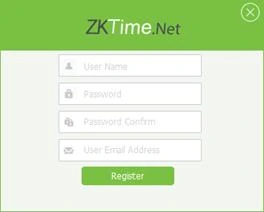
- Software login: the administrator you registered on first run.
- Terminal admin: the menu password on the K40 Pro. See forgot admin password.
- Comm Key: the connection password between PC and terminal.
02What to try
- Ask colleagues whether another administrator account exists.
- Check where the password was recorded.
- Back up the database before any recovery attempt.
- Contact the supplier for the recovery process for your version.
03What not to do
- Do not delete the database or reinstall without backing up.
- Do not use password crackers from unknown websites.
- Do not share the password by chat.
04Prevent a repeat
Keep the admin password in a sealed envelope or a password manager and create a second administrator account. See backup.
05We can help
If you bought from Qyvea, message us on WhatsApp with your invoice and we will guide you.
06A typical scenario
An HR manager left without handing over the password. The company found a second administrator account that had been created earlier and reset the login from there, keeping all the data.
Illustrative example based on common cases, not a named customer.
07Common mistakes
- Deleting the database.
- Using unknown cracking tools.
- Single admin account.
- Passwords in chats.
- No backups.
08Quick checklist
- Try another admin
- Back up the database
- Ask the supplier
- Create a second admin
- Store passwords safely
- Test
09Frequently asked questions
Can I reinstall to reset it?
A reinstall keeps the database if you do not delete it, but the login may remain. Ask first.
Is there a default password?
Older versions may use defaults; do not rely on it.
Will I lose attendance data?
Not if you keep the database.
Is it the same as the terminal password?
No.
This guide is part of our ZKTeco K40 and ZKBio Time.Net series. For the full start-to-finish walkthrough with screenshots, read How to Configure a ZKTeco K40 Pro with ZKBio Time.Net.
ZKTeco and ZKBio are trademarks of ZKTeco Inc. Menu names on the K40 Pro and in the software vary slightly by firmware and software version; where yours differ, look for the nearest match. Qyvea is a ZKTeco reseller and installer in Kenya.
