
On this page
01. The usual defaults02. Check yours on the K40 Pro03. If the default IP does not match your network04. About the Comm Key05. Can I change port 4370?06. A typical scenario07. Common mistakes08. Quick checklist09. Frequently asked questions
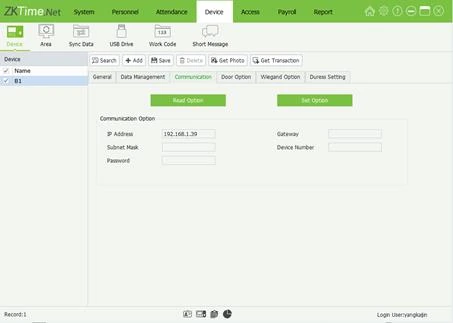
Many ZKTeco terminals default to IP 192.168.1.201, port 4370 and Comm Key 0 (no password). Your K40 Pro may be set differently by the supplier, so confirm on the device under Menu > Comm.
Key takeaways
- Common defaults: 192.168.1.201, port 4370, Comm Key 0.
- Always confirm on the device menu.
- Changing the port needs the same change in the software.
- A Comm Key blocks unwanted software connections.
01The usual defaults
- IP address: 192.168.1.201 on many ZKTeco models.
- Port: 4370 for TCP/IP communication.
- Comm Key: 0, meaning no connection password.
- Device number: 1 unless you run several on one link.
These are common factory values, not a promise. Suppliers and previous users change them.
02Check yours on the K40 Pro
- Press Menu and sign in as administrator.
- Open Comm. and look under Ethernet for IP, mask and gateway.
- Look for the Comm Key or connection password and the Device ID/Number.
- The port is shown in the same area, or in the system information screen on some firmware.
03If the default IP does not match your network
A device at 192.168.1.201 will not talk to a PC at 192.168.0.10, because the third number differs. Change the terminal to a free address in your own range. See how to set the IP.
04About the Comm Key
The Comm Key is a numeric password the software must supply before it can talk to the terminal. Set one if the terminal sits where others could reach it on the network. If you forget it, you can reset it from the device menu with administrator rights. A mismatch shows as a failed connection; see Connect to Terminal failed.
05Can I change port 4370?
Yes, but then the software must use the new port, and any router or firewall rule must allow it. Most offices never need to change it.
06A typical scenario
A Ruiru warehouse technician tried the default 192.168.1.201 on a network that ran on 10.0.0.x. Nothing replied. Reading the real address from the terminal's Comm. menu showed the supplier had already set 10.0.0.60, and the connection worked at once.
Illustrative example based on common cases, not a named customer.
07Common mistakes
- Assuming the defaults without checking the device menu.
- Typing 4730 or 3470 instead of 4370.
- Entering a password that does not match the terminal's Comm Key.
- Changing the port on the device but not in the software.
- Forgetting the Comm Key after setting one.
08Quick checklist
- Check IP under Menu then Comm.
- Confirm port (usually 4370)
- Confirm Comm Key (0 means none)
- Record all three
- Use the same values in the software
- Keep the record with the terminal
09Frequently asked questions
What is the default password of a ZKTeco K40?
The connection Comm Key is normally 0. Menu admin passwords are different and are set by whoever installed the terminal. See forgot admin password.
Why does 192.168.1.201 not answer?
Your PC is probably on a different range, or the supplier changed the IP. Check the device menu and run ping.
Is port 4370 TCP or UDP?
The software connection uses TCP/IP on port 4370 in the standard setup.
Can two terminals share port 4370?
Yes, as long as they have different IP addresses.
This guide is part of our ZKTeco K40 and ZKBio Time.Net series. For the full start-to-finish walkthrough with screenshots, read How to Configure a ZKTeco K40 Pro with ZKBio Time.Net.
ZKTeco and ZKBio are trademarks of ZKTeco Inc. Menu names on the K40 Pro and in the software vary slightly by firmware and software version; where yours differ, look for the nearest match. Qyvea is a ZKTeco reseller and installer in Kenya.
